
Introduction
To integrate with our API, you will need to obtain a username and password from our company, Blink. These credentials will serve as your authentication information for making API requests.
Follow these steps to acquire the necessary credentials:
- Contact our company, Blink, to express your interest in integrating with our API. You can reach out to our support team or designated API contact for assistance.
- Provide the required details about your application and the purpose of integration. This information will help us understand your specific needs and ensure a smooth integration process.
- Once your request is approved, we will provide you with a unique username and password. These credentials will be associated with your account and grant you access to our API.
- Safeguard your username and password as confidential information. Treat them with the same level of security as you would for other sensitive credentials associated with your application.
- You are now ready to proceed with integrating our API into your application. Include the provided username and password in your API requests as part of the authentication process.
Base URLs
Authorization API
The Authorization API allows you to interact with Blink API's. Obtain a bearer token using your credentials.
Endpoint
Request Parameters
| Parameter | Type | Required | Description |
|---|---|---|---|
| username | string | required | Blink will provide the required username. |
| password | string | required | Blink will provide the required password. |
Sample Payload
{
    "username": "xxxxxxxxx",
    "password": "xxxxxxxxx"
}
Sample Response
{
    "token_type": "Bearer",
    "access_token": "eyJ0eXAiOiJKV1QiLCJhbGciOiJIUzI1NiJ9....."
}
If your request is valid, the authorization server will return an access token. If your request is invalid, it will return an error message.
Using the Token
curl -X GET \
    URL/interface/v1/branches \
    -H 'Authorization: Bearer eyJ0eXAiOiJKV1Qi...' \
    -H 'Content-Type: application/json'
Fetch Categories
This API allows you to fetch all categories from your Blink restaurant's menu system.
Endpoint
Sample Response
{
    "msg": "Categories fetched successfully",
    "success": true,
    "error": null,
    "data": [
        {
            "id": "663d24530",
            "blink_id": 106916,
            "name": "Turkish Coffee",
            "status": 1,
            "branch_status": [
                {
                    "branch_id": 55195,
                    "status": 1,
                    "available_from": "11:00",
                    "available_till": "12:00"
                }
            ]
        }
    ]
}
Stock and Price Syncing
This API allows you to manage products stock & prices in your restaurant's menu. By sending the menu data in the specified format, you can update the stock and price.
Endpoint
Request Parameters
| Parameter | Type | Required | Description |
|---|---|---|---|
| products | array | required | An array containing the details of the products. |
| products.id | string | required | The ID of the product. |
| products.price | decimal | required | The price of the product. |
| products.discount_price | decimal | required | The discount price of the product (send 0 if no discount). |
| products.branches | array | required | An array containing the branches associated with the product. |
| products.branches.id | string | required | The ID of the branch. |
| products.branches.price | decimal | sometimes | The price of the product in the specific branch (null if price is same). |
| products.branches.discount_price | decimal | sometimes | The discounted price of the product in the specific branch (null if price is same). |
| products.branches.stock_quantity | integer | sometimes | The stock of the product in the specific branch. |
Sample Payload
{
    "products": [
        {
            "id": "97358ecc-06aa-4a8c-8249-6113261ac5a8",
            "price": 94.72,
            "discount_price": 94.72,
            "branches": [
                {
                    "id": "12345",
                    "is_active": true,
                    "price": 94.72,
                    "discount_price": 94.72,
                    "stock_quantity": 1
                }
            ]
        }
    ]
}
Order Status Webhook
The Order Status Webhook allows you to manage order status in your restaurant's system.
Receive Order Status Updates
A webhook is a mechanism used to inform external applications about specific events in real-time. Rather than requiring applications to constantly query the API for the latest data, Blink sends a webhook notification whenever a particular event occurs.
POST URL to Blink, in order to receive real-time orders status updates.Webhook Timeout
Blink webhooks have a timeout of 5 seconds for requests. If your server fails to respond within this timeframe, the request will be terminated and not processed further.
Request Parameters
| Field | Type | Description |
|---|---|---|
| branch_id | string | Represents the branch id of blink's system. |
| blink_order_id | string | Represents the order id of blink's system. |
| status | int | Current status of order according to order status table. |
| statusText | string | Represents the status text of order i.e "Accepted"/"Dispatched"/"Delivered" etc. |
| comment | string | Reason of order rejection. |
| tracking_url | string | URL to track the order(only when order is dispatched). |
| created_at | datetime | Timestamp of when the status was updated (UTC). |
| action_by | string | Represents who performed the action on the order. |
Sample Webhook Payload
{
    "blink_order_id": "1236589",
    "branch_id": "12345",
    "status": 4,
    "statusText": "Rejected",
    "comment": "TEST ORDER",
    "tracking_url": "",
    "created_at": "2023-10-10 12:00:00",
    "action_by": "Restaurant"
}
Branches
The API allows you to fetch all branches from blink's system.
Endpoint
Sample Response
{
    "msg": "Success",
    "success": true,
    "error": null,
    "data": [
        {
            "id": 63,
            "blink_id": 60001,
            "branch": "Clifton-Block 4",
            "branch_address": "209 Bolvard center, caspian road beside Hollywood Cafe",
            "lat": "24.8215",
            "lng": "67.0099",
            "pay_type": "Both",
            "delivery_type": "delivery",
            "tax_percentage": "5",
            "tax_percentage_online": "5",
            "menu_inclusive_tax": 0,
            "inclusive_tax_percentage_online": "0",
            "is_live": 1,
            "is_active": 1,
            "timings": [
                {
                    "id": 1407174,
                    "rest_brId": 56412,
                    "days": 1,
                    "opening_hour": "12:00 PM",
                    "closing_hour": "06:00 PM",
                    "dinner_opening_hour": "06:00 PM",
                    "dinner_closing_hour": "01:45 AM",
                    "delivery_type": "0,2,4,5,6"
                },
                {
                    "id": 1407175,
                    "rest_brId": 56412,
                    "days": 2,
                    "opening_hour": "12:00 PM",
                    "closing_hour": "06:00 PM",
                    "dinner_opening_hour": "06:00 PM",
                    "dinner_closing_hour": "01:45 AM",
                    "delivery_type": "0,2,4,5,6"
                },
                {
                    "id": 1407176,
                    "rest_brId": 56412,
                    "days": 3,
                    "opening_hour": "12:00 PM",
                    "closing_hour": "06:00 PM",
                    "dinner_opening_hour": "06:00 PM",
                    "dinner_closing_hour": "01:45 AM",
                    "delivery_type": "0,2,4,5,6"
                },
                {
                    "id": 1407177,
                    "rest_brId": 56412,
                    "days": 4,
                    "opening_hour": "12:00 PM",
                    "closing_hour": "06:00 PM",
                    "dinner_opening_hour": "06:00 PM",
                    "dinner_closing_hour": "01:45 AM",
                    "delivery_type": "0,2,4,5,6"
                },
                {
                    "id": 1407178,
                    "rest_brId": 56412,
                    "days": 5,
                    "opening_hour": "12:00 PM",
                    "closing_hour": "06:00 PM",
                    "dinner_opening_hour": "06:00 PM",
                    "dinner_closing_hour": "01:45 AM",
                    "delivery_type": "0,2,4,5,6"
                },
                {
                    "id": 1407179,
                    "rest_brId": 56412,
                    "days": 6,
                    "opening_hour": "12:00 PM",
                    "closing_hour": "06:00 PM",
                    "dinner_opening_hour": "06:00 PM",
                    "dinner_closing_hour": "01:45 AM",
                    "delivery_type": "0,2,4,5,6"
                },
                {
                    "id": 1407180,
                    "rest_brId": 56412,
                    "days": 7,
                    "opening_hour": "12:00 PM",
                    "closing_hour": "06:00 PM",
                    "dinner_opening_hour": "06:00 PM",
                    "dinner_closing_hour": "01:45 AM",
                    "delivery_type": "0,2,4,5,6"
                }
            ]
        }
    ]
}
Branch Geofence
This API allows you to retrieve geofence information for a specific branch, including delivery zones and their associated details.
Endpoint
Authorization
Path Parameters
| Parameter | Type | Description |
|---|---|---|
| blink_branch_id | integer | The unique identifier of the branch. Example: 58938 |
Sample Response
{
    "current_page": 1,
    "data": [
        {
            "id": 2077293,
            "geofence_id": 774,
            "min_order": 3000,
            "delivery_charges": 250,
            "max_delivery_time": 45,
            "geofence": {
                "id": 774,
                "area_name": "Askari 5",
                "geoFence": "[31.50351400666787, 74.33634336049136],[31.499882381525516, 74.34039349610384],[31.498226606367925, 74.3410533195215],[31.495976168816483, 74.34269483143862],[31.496616542738455, 74.34340293461855],[31.49414650487571, 74.34634263569887],[31.493048689328578, 74.34494788701113],[31.493048689328578, 74.34443290288027],[31.491932563644955, 74.34293086583193],[31.493195065479515, 74.341321540423],[31.494201395314875, 74.34265191609438],[31.49509793459256, 74.34192235524233],[31.495902982946234, 74.3390899425226],[31.498921852546648, 74.33655793721255],[31.500838326759737, 74.337180209704],[31.502864532429104, 74.33569963032778]",
                "lat": "31.499815906618338",
                "lng": "74.34168346085198"
            }
        },
        {
            "id": 2077294,
            "geofence_id": 1169,
            "min_order": 3000,
            "delivery_charges": 250,
            "max_delivery_time": 45,
            "geofence": {
                "id": 1169,
                "area_name": "Gulberg 2",
                "geoFence": "[31.530427173501455, 74.33732646678754],[31.53390215498574, 74.34071677898237],[31.526695996795844, 74.34917110179731],[31.532073233482027, 74.35247558330366],[31.53028085565456, 74.35719627116987],[31.52709838576833, 74.35608047221967],[31.52676915855614, 74.35711044048139],[31.52446453557723, 74.35702460979292],[31.52446453557723, 74.3609299061186],[31.523623151114233, 74.36071532939741],[31.518611269256475, 74.36032909129926],[31.518391764635318, 74.35794728969404],[31.518501517010336, 74.35659545635053],[31.51872102137366, 74.35586589549848],[31.518538101106724, 74.34741157268354],[31.518940525221286, 74.34239047740766],[31.519233196215865, 74.34020179485151],[31.521867193909923, 74.3383993503935],[31.52333049387237, 74.3393005726225],[31.52410980629154, 74.34341172718041],[31.52469511497521, 74.34523562931054],[31.524146388191717, 74.3451927139663],[31.52374398650182, 74.34534291767113],[31.523433038554135, 74.34581498645775],[31.523487911796575, 74.34648017429345],[31.523085507270057, 74.34753160022728],[31.524018351478425, 74.34817533039086],[31.524439042877408, 74.3472097351455],[31.52513409408108, 74.34669475101464],[31.525609652451013, 74.34557895206444],[31.526219870591486, 74.34464218768403],[31.52867077085817, 74.3429255739145],[31.529804747725517, 74.3423676744394],[31.528378129431474, 74.34052231463716]",
                "lat": "31.52313887799819",
                "lng": "74.35459170590512"
            }
        }
    ],
    "first_page_url": "https://api.blinkco.io/interface/v1/branches/58938/geofences?page=1",
    "from": 1,
    "last_page": 1,
    "last_page_url": "https://api.blinkco.io/interface/v1/branches/58938/geofences?page=1",
    "links": [
        {
            "url": null,
            "label": "« Previous",
            "active": false
        },
        {
            "url": "https://api.blinkco.io/interface/v1/branches/58938/geofences?page=1",
            "label": "1",
            "active": true
        },
        {
            "url": null,
            "label": "Next »",
            "active": false
        }
    ],
    "next_page_url": null,
    "path": "https://api.blinkco.io/interface/v1/branches/58938/geofences",
    "per_page": 30,
    "prev_page_url": null,
    "to": 14,
    "total": 14,
    "msg": "Success",
    "success": true,
    "error": null
}
Customers
The API allows you to fetch all customers from blink's system.
Endpoint
Request Parameters
| Field | Type | Required | Description |
|---|---|---|---|
| phone | string | optional | Represents the phone number of the customer (Format: 923XXXXXXXXX). |
| created_at | datetime | optional | Filter to return users who were created after the specified date. |
Sample Response
{
    "msg": "Success",
    "success": true,
    "error": null,
    "data": {
        "current_page": 1,
        "data": [
            {
                "full_name": "John Doe",
                "phone": "+9233XXXXXXX",
                "gender": "Male",
                "date_of_birth": "1990-01-01",
                "created_at": "2023-01-01 00:00:00",
                "email": "[email protected]",
                "wallet_balance": "23",
                "loyalty_points": "100"
            }
        ],
        "first_page_url": "URL/interface/v1/customers?page=1",
        "from": 1,
        "last_page": 1,
        "last_page_url": "URL/interface/v1/customers?page=1",
        "next_page_url": null,
        "path": "URL/interface/v1/customers",
        "per_page": 100,
        "prev_page_url": null,
        "to": 4,
        "total": 4
    }
}
Customers Address
The API allows you to fetch all addresses associated with a customer.
Endpoint
Request Parameters
| Field | Type | Required | Description |
|---|---|---|---|
| phone | string | optional | Represents the phone number of the customer (Format: 923XXXXXXXXX). |
Sample Response
{
    "msg": "Success",
    "success": true,
    "error": null,
    "data": [
        {
            "id": 12449493,
            "userId": 9625729,
            "label": "",
            "lat": 33.6037613,
            "lng": 73.0041906,
            "house_num": "house no 2551, ilyas colony, misrial road",
            "street": null,
            "floor": null,
            "building": null,
            "addressText": "Misriyal Road, Islamabad/ Rawalpindi",
            "areaId": null,
            "cityId": null,
            "countryId": null,
            "stateId": null,
            "branch_geofence_id": 2344220,
            "isDefault": null,
            "status": 1,
            "optionalText": null,
            "created_at": "2026-09-15 16:00:21",
            "short_address": null
        }
    ]
}
Map Branches
By following these steps you can map your branches with Blink's system.
- Log in to your account and access the administration panel.
- Locate and click on the Branch Settings option in the side menu.
- In the Branch Settings page, you will see a list of your branches.
- Find the branch you want to map and click on the Edit button. This will take you to the Edit Branch Settings page, where you can configure branch-specific settings.

- Look for the tab labeled Step 2 and click on it to proceed.
- Enter the branch code accurately in the Third Party Branches field.
- After completing all the required configurations, click on the Save Branch Settings button to save your changes.

By following these steps, you will successfully map your system branches with our system. If you encounter any issues, please contact our support team for assistance.
Create Webhook
This API allows you to register a webhook subscription so Blink can notify your system in real-time when specific events occur, such as order creation or order status updates.
Endpoint
Authorization
Request Parameters
| Parameter | Type | Required | Description |
|---|---|---|---|
| name | string | required | A descriptive name for the webhook. |
| webhook_url | string | required | The destination URL that will receive the POST webhook notifications. |
| header_key | string | optional | Name of a custom header to send with each webhook request (e.g. for authentication). |
| header_key_value | string | optional | Value of the custom header defined in header_key. |
| excluded_branch_ids | array | optional | Array of branch IDs that should be excluded from triggering this webhook. |
| status | boolean | required | Whether the webhook is active (true) or disabled (false). |
| type | string | required | The event type this webhook subscribes to: 1 for order created, 2 for order status update. |
Sample Payload
{
    "name": "Order Notification Webhook",
    "webhook_url": "https://example.com/webhooks/order-notify",
    "header_key": "X-Api-Key",
    "header_key_value": "a1b2c3d4e5f6",
    "excluded_branch_ids": [12, 15, 20],
    "status": true,
    "type": "1"
}
Sample Response
{
    "msg": "Success",
    "success": true,
    "error": null,
    "data": {
        "id": 1,
        "name": "Order Notification Webhook",
        "webhook_url": "https://example.com/webhooks/order-notify",
        "header_key": "X-Api-Key",
        "header_key_value": "a1b2c3d4e5f6",
        "excluded_branch_ids": [12, 15, 20],
        "status": true,
        "type": "order_created",
        "created_at": "2026-08-31T10:15:30.000000Z",
        "updated_at": "2026-08-31T10:15:30.000000Z"
    }
}
Order Webhook
The Order Webhook allows you to manage orders in your restaurant's system.
Receive an Order
A webhook is a mechanism used to inform external applications about specific events in real-time. Rather than requiring applications to constantly query the API for the latest data, Blink sends a webhook notification whenever a particular event occurs.
POST URL to Blink, in order to receive real-time orders.Webhook Timeout
Blink webhooks have a timeout of 5 seconds for requests. If your server fails to respond within this timeframe, the request will be terminated and not processed further.
Request Parameters
| Field | Type | Description |
|---|---|---|
| blink_order_id | string | Represents the order id of blink's system. |
| external_order_id | string | Represents the order id of third-party channel (e.g Foodpanda). |
| order_source | string | Represents the source of the order (e.g Foodpanda). |
| order_key | string | The customers have this alphanumeric order no. |
| type | string | Represents the type of order: "PICK-UP" / "DINE-IN" / "DELIVERY". |
| order_edit_count | string | Represents the number of times the order has been edited. |
| status | string | Represents the status of the order (0, 1 etc). |
| status_text | string | Represents the status text (e.g "Pending", "Accepted"). |
| currency | string | Currency of the order (e.g "PKR", "USD"). |
| channel | string | The channel from which order is received (e.g ANDROID, IOS, WEBSITE, CALL-IN ORDER, QR ORDER, FOODPANDA). |
| channel_id | string | The channel Id (e.g ANDROID=7, IOS=8, WEBSITE=9, CALL-IN ORDER=10, QR ORDER=11, FOODPANDA=12). |
| brand_id | string | The ID of the brand associated with the order. |
| branch_id | string | The ID of the branch associated with the order. |
| area_name | string | The name of the area associated with the order. |
| blink_branch_id | string | The blink ID of the branch. |
| branch_latitude | string | The latitude of the branch. |
| branch_longitude | string | The longitude of the branch. |
| branch_address | string | The address of the branch. |
| total_discount_amount | integer | The total amount of discount applied. |
| promo_code | string | The promotional code used, if any. |
| promo_discount | integer | The discount amount applied through the promotional code. |
| loyalty_amount | float | The loyalty amount applied on order. |
| wallet_amount | float | The wallet amount applied on order. |
| fbr_pos_charge | float | The FBR POS charge applied on order. |
| tax | float | The tax applied on order. |
| kitchen_notes | string | Additional notes or instructions for the kitchen. |
| created_at | string | The creation time (UTC). |
| due_at | string | The order place time (ASAP) or due time (UTC) for pre-orders. |
| is_pre_order | integer | The is_pre_order will be either 0 or 1. |
| customer_name | string | The name of the customer placing the order. |
| customer_phone | string | The phone number of the customer. |
| customer_address_description | string | Description of the customer's address. |
| customer_address_latitude | null | The latitude of the customer's address. |
| customer_address_longitude | null | The longitude of the customer's address. |
| payment | boolean | Returns true if paid, else false. |
| payment_method | string | The payment method (Cash or other selected method). |
| payment_method_id | string | The payment method ID (Cash=0, or other). |
| delivery_charges | string | The delivery charges. |
| pos_fee | string | The pos fee of order(if any). |
| subtotal | string | The subtotal of order. |
| total_price | string | The total price of order. |
| products | array | An array of products included in the order. |
| products[].product_id | string | The ID of the product. |
| products[].quantity | integer | The quantity of the product. |
| products[].name | string | The name of the product. |
| products[].unit_price | string | The unit price of the product. |
| products[].total_price | integer | The total price of the product. |
| products[].item_price | integer | The item price of the product. |
| products[].item_discount_price | integer | The item discount price of the product. |
| products[].options | array | An array of options chosen for the product. |
| products[].options[].modifier_option_id | string | The ID of the selected modifier option. |
| products[].options[].unit_price | string | The unit price of the selected modifier option. |
| products[].options[].total_price | string | The total price of the selected modifier option. |
| products[].options[].item_price | string | The item price of the selected modifier option. |
| products[].options[].item_discount_price | string | The item discount price of the selected modifier option. |
| products[].options[].name | string | The name of the selected modifier option. |
| products[].options[].quantity | integer | The quantity of the selected modifier option. |
Webhook Payload
{
    "blink_order_id": "1236589",
    "external_order_id": "UYI-9IY",
    "order_source": "FOODPANDA",
    "order_key": "ABND-24234",
    "type": "PICK-UP",
    "order_edit_count": "0",
    "status": "0",
    "status_text": "PENDING",
    "currency": "PKR",
    "channel": "IOS",
    "channel_id": "8",
    "area_name": "Precinct-11A",
    "brand_id": "2131",
    "branch_id": "12345",
    "blink_branch_id": "50220",
    "branch_latitude": "27.4654584",
    "branch_longitude": "64.846548",
    "branch_address": "XYZ road street 13",
    "total_discount_amount": 0,
    "promo_code": "",
    "promo_discount": 0,
    "wallet_amount": 0,
    "loyalty_amount": 0,
    "tax": 0,
    "fbr_pos_charge": 1,
    "kitchen_notes": "",
    "created_at": "2024-06-26 09:26:04",
    "due_at": "2024-06-26 09:26:04",
    "is_pre_order": 0,
    "customer_name": "John Doe",
    "customer_phone": "+923300000000",
    "customer_address_description": "PICK-UP",
    "customer_address_latitude": null,
    "customer_address_longitude": null,
    "products": [
        {
            "product_id": "1c54bd7abe7b",
            "quantity": 1,
            "name": "Veg Breakfast Press COMBO",
            "unit_price": "39.000",
            "total_price": 39,
            "item_price": "39.00",
            "item_discount_price": "0.00",
            "options": [
                {
                    "modifier_option_id": "cfeed7290c4c",
                    "unit_price": "0.000",
                    "total_price": "0.000",
                    "name": "Tortilla (Wrap)",
                    "quantity": 1,
                    "item_price": "0.00",
                    "item_discount_price": "0.00"
                }
            ]
        }
    ],
    "payment": true,
    "payment_method_id": "0",
    "payment_method": "Cash",
    "delivery_charges": "0",
    "pos_fee": "0",
    "subtotal": "59",
    "total_price": "66.67"
}
Orders
Submit, retrieve, and manage orders through the Blink API
Cart Calculator
This API calculates the final pricing breakdown for a cart before order submission. It validates dish availability, applies promotions, loyalty points, wallet balance, delivery charges, and taxes, returning a full price breakdown along with a list of any unavailable dishes.
Endpoint
Authorization
Request Parameters
| Parameter | Type | Required | Description |
|---|---|---|---|
| customer_number | string | required | Customer's phone number, used to look up the user account. |
| rest_brId | integer | required | Restaurant branch ID. |
| sessionId | string | required | Session identifier for the cart/checkout session. |
| payment_type | string | required | Payment method, e.g. "COD" or "Online". |
| dishes | array | required | Array of dish objects in the cart. |
| dishes[].dishId | integer | required | ID of the dish (Dish.id). |
| dishes[].quantity | integer | required | Quantity ordered. |
| dishes[].options | array | optional | Selected modifiers/options for the dish. |
| dishes[].options[].id | integer | required if options present | DishOption ID. |
| dishes[].options[].name | string | required if options present | Modifier/option group name. |
| dishes[].options[].suboptions_data | array | required if options present | Selected sub-options. |
| dishes[].options[].suboptions_data[].id | integer | required | DishSubOption ID. |
| dishes[].options[].suboptions_data[].quantity | integer | optional (default 1) | Quantity of the sub-option. |
| push_token | string|null | optional (default null) | Device push notification token. |
| delivery_type | integer | optional (default 0) | Type of delivery (used for promotion matching, branch delivery-type restrictions). |
| order_type | mixed | optional (default null) | Order type, passed to promotion lookup. |
| promo_discount | numeric | optional (default null) | Manually applied promo discount amount. |
| promo_code | string | optional | Promo code (currently referenced but logic commented out). |
| loyalty | numeric | optional (default 0) | 1 to apply available loyalty points, else 0. |
| wallet | numeric | optional (default 0) | 1 to apply wallet balance, else 0. |
| loyalty_amount | numeric | optional | Specific loyalty amount requested to redeem (used only if loyalty logic is active). |
| geofence_id | integer | optional (default 0) | Geofence ID used to determine delivery charges. |
| circular_id | integer | optional (default 0) | Circular delivery-radius ID (alternate to geofence). |
| is_checkout_page | integer (0/1) | optional (default 1) | Flag indicating whether request originates from checkout page. |
Sample Payload
{
    "customer_number": "+923001234567",
    "rest_brId": 54102,
    "sessionId": "qFXK7Doxvlp6JWjJ",
    "payment_type": "COD",
    "geofence_id": 15,
    "promo_discount": 0,
    "loyalty": 0,
    "wallet": 0,
    "is_checkout_page": 1,
    "dishes": [
        {
            "dishId": 2818081,
            "quantity": 2,
            "options": [
                {
                    "id": 2163342,
                    "name": "Size",
                    "suboptions_data": [
                        {
                            "id": 14613703,
                            "quantity": 1
                        }
                    ]
                }
            ]
        },
        {
            "dishId": 2818094,
            "quantity": 2
        }
    ]
}
Sample Response
{
    "menu_inclusive_tax_percent": 0,
    "menu_inclusive_tax_amount": 0,
    "subtotal": 41,
    "actual_subtotal": 41,
    "promotional_discount": 0,
    "rounding_amount": 0,
    "tax": 0,
    "tax_percentage": 0,
    "delivery_charges": 0,
    "fbr_pos_charge_value": 8,
    "total_price": 49,
    "delivery_message": "",
    "wallet_amount": 0,
    "loyalty_amount": 0,
    "products": [
        {
            "details": "Dafah Seeds|حب الضفة~Size~250 G|250 جرام,",
            "sub_option_array": [14613703],
            "quantity": 2,
            "unit_price": 20.5,
            "total_price": 41,
            "actual_price": 20.5,
            "actual_total_price": 41,
            "dishId": 2818081,
            "dish_name": "Dafah Seeds|حب الضفة",
            "tax": 0,
            "taxAmount": 0
        }
    ],
    "loyalty_points_earned": "",
    "alert_msg": " is not available at the moment. Kindly remove it from cart and place the order again.",
    "not_available_dishes": {
        "id": [2818094],
        "name": ["Texas BBQ Seasoning 100g|تتبيلة تكساس باربكيو 100غ"]
    }
}
Response Structure
| Field | Type | Description |
|---|---|---|
| menu_inclusive_tax_percent | float | Tax percentage already included in menu price (0 if not applicable). |
| menu_inclusive_tax_amount | float | Amount of tax embedded in the menu price. |
| subtotal | float | Total price of cart after applying discounts (promo/loyalty pricing). |
| actual_subtotal | float | Total price of cart at original (non-discounted) prices. |
| promotional_discount | float | Difference between actual_subtotal and subtotal. |
| rounding_amount | float | Amount adjusted due to rounding (currently always 0). |
| tax | float | Total tax amount applied to the order. |
| tax_percentage | float | Overall tax percentage applied (0 if item-level tax is used instead). |
| delivery_charges | float | Calculated delivery charges based on geofence/circular radius/threshold. |
| fbr_pos_charge_value | float | Fixed POS charge added to total (if fbr_pos_charge_enabled is 1 on branch). |
| total_price | float | Final payable amount = subtotal - promo_discount + delivery_charges + tax - loyalty_amount - wallet_amount + fbr_pos_charge_value. |
| delivery_message | string | Message about delivery charges (e.g. "You've got FREE delivery!", or amount needed for free delivery). |
| wallet_amount | float | Wallet amount deducted from the order (0 if not applied). |
| loyalty_amount | float | Loyalty points value deducted from the order (0 if not applied). |
| products | array | Line items successfully added to the cart (see below). |
| loyalty_points_earned | string | Message indicating loyalty points to be earned, or empty string if none. |
| alert_msg | string | Warning message if any dish(es) in cart are unavailable; empty if all available. |
| not_available_dishes | object | {id: [], name: []} — lists unavailable dish IDs/names. Empty object {} if none. |
Products Array Structure
| Field | Type | Description |
|---|---|---|
| details | string | Human-readable string describing dish name + selected options/sub-options. |
| sub_option_array | array<int> | IDs of selected sub-options (DishSubOption.id). |
| quantity | integer | Quantity ordered. |
| unit_price | float | Price per unit (dish price + sum of sub-option prices), discounted if promo applied. |
| total_price | float | unit_price * quantity. |
| actual_price | float | Original (non-discounted) unit price. |
| actual_total_price | float | actual_price * quantity. |
| dishId | integer | Dish ID. |
| dish_name | string | Dish name. |
| tax | float | Item-level tax percentage (0 if item-level tax disabled). |
| taxAmount | float | Tax amount for this line item. |
products[] and instead reported in not_available_dishes.
Submit Order
This API allows you to push new orders to the Blink system.
Endpoint
Authorization
Request Parameters
| Parameter | Type | Required | Description |
|---|---|---|---|
| blink_branch_id | string | required | Represents the branch id of blink's system. |
| source | string | required | E.g CONVIYO/FOODPANDA/GRUBTECH |
| delivery.house_num | string | required | The house/flat number of the customer. |
| delivery.street | string | required | The street name of the customer's address. |
| delivery.building | string | optional | The building name in the customer's address. |
| delivery.area | string | required | The area/locality of the customer's address. |
| delivery.city | string | required | The city of the customer's address. |
| delivery.latitude | float | optional | The latitude coordinate of the customer's address. |
| delivery.longitude | float | optional | The longitude coordinate of the customer's address. |
| customer_id | string | optional | Blink customer id. |
| customer_name | string | required | The name of the customer placing the order. |
| customer_phone | string | required | The phone number. Formats: +92xxxx, +92xxx-xxx |
| customer_email | string | optional | The email address of the customer. |
| is_scheduled | integer | required | Indicates if the order is scheduled (1) or ASAP (0). |
| scheduled_delivery_time | string | optional | The scheduled time for delivery (if applicable). |
| delivery_type | string | required | The type of delivery: dinein, pickup, or delivery. |
| payment_method | string | required | The selected payment method: Cash, Card on Delivery, or Online. |
| tax_amount | float | optional | The tax amount applied to the order. |
| tax_percentage | float | optional | The tax percentage applied on the subtotal. |
| subtotal | float | required | The subtotal of the order before taxes and charges. |
| actual_subtotal | float | required | The original subtotal of the order before taxes, charges, and menu-level discounts are applied. |
| total | float | required | The final total amount of the order. |
| delivery_charges | float | required | The charges applied for delivery. |
| promo_discount | float | optional | The discount amount applied using the promo code. |
| promo_code | string | optional | The promo code applied to the order. |
| fbr_pos_charge | float | optional | The FBR POS charge applied to the order. |
| loyalty_discount | float | optional | The discount amount applied using the customer's loyalty points or rewards. |
| wallet_discount | float | optional | The discount amount deducted from the order using the customer's wallet balance. |
| delivery_eta | integer | optional | Estimated delivery time in minutes. Default: 60 |
| instructions | string | optional | Any additional instructions from the customer. |
| items | array | required | An array of items included in the order. |
| items[].blink_item_id | string | required | The blink's ID of the ordered item. |
| items[].name | string | required | The name of the ordered item. |
| items[].description | string | optional | The description of the ordered item. |
| items[].notes | string | optional | Additional notes for the item. |
| items[].actual_price | float | required | The original price of the item. |
| items[].price | float | required | The selling price of the item. |
| items[].quantity | integer | required | The quantity of the item ordered. |
| items[].sub_options | array | optional | An array of sub-options/modifiers for the item. |
| items[].sub_options[].sub_option_id | string | required_with: modifiers | The ID of the sub-option. |
| items[].sub_options[].price | float | sometimes | The price of the selected sub-option. Send 0 if the sub-option has no additional price. |
| items[].sub_options[].quantity | integer | required_with: modifiers | The quantity of the selected sub-option. |
Sample Payload
{
    "blink_branch_id": "60002",
    "source": "CONVIYO",
    "customer_id": "123456",
    "customer_phone": "+92333-2222222",
    "customer_name": "Test Order User",
    "delivery": {
        "house_num": "Flat B-1203",
        "street": "Rashid Minhas Road",
        "building": "Noman Grand City",
        "area": "Gulshan-e-Iqbal Block 7",
        "city": "Karachi",
        "latitude": 24.918682,
        "longitude": 67.102982
    },
    "is_scheduled": 1,
    "scheduled_delivery_time": "22-05-2025 08:00 PM",
    "delivery_type": "delivery",
    "payment_method": "Cash",
    "tax_amount": "12",
    "tax_percentage": "0",
    "subtotal": "175",
    "actual_subtotal": "225",
    "promo_discount": "10",
    "promo_code": "WELCOME10",
    "fbr_pos_charge": "0",
    "loyalty_discount": "5",
    "wallet_discount": "10",
    "delivery_charges": "30",
    "total": "192",
    "delivery_eta": 45,
    "instructions": "test note",
    "items": [
        {
            "blink_item_id": "257327",
            "name": "Nestle MilkPak Full Cream Milk 250ml",
            "description": "Nestle MilkPak Full Cream Milk 250ml",
            "notes": "test note",
            "actual_price": "110",
            "price": "85",
            "quantity": "2",
            "sub_options": [
                {
                    "sub_option_id": "596996",
                    "price": "5",
                    "quantity": "1"
                }
            ]
        }
    ]
}
Sample Response
{
    "success": true,
    "msg": "Your order has been placed",
    "data": {
        "id": 988278,
        "unique_code": "2349-JLMD3"
    }
}
Fetch Order
This API allows you to get order details from blink's system.
Endpoint
Authorization
Query Parameters
| Parameter | Type | Required | Description |
|---|---|---|---|
| order_id | string | required | The ID of the order. Example: 34862444 |
| unique_code | string | optional | The unique code of the order. |
Sample Response
{
    "success": true,
    "data": {
        "id": 988309,
        "unique_code": "1T4I-C7WC1",
        "customer_name": "Test Order User",
        "customer_phone": "+923332222222",
        "latitude": "24.918682",
        "longitude": "67.102982",
        "delivery_eta": 45,
        "delivery_type": "delivery",
        "status": "ACCEPTED",
        "ordertime": "2025-05-22 08:02:10",
        "instruction": "test note",
        "payment_method": "Cash",
        "subtotal": 90,
        "total": 132,
        "delivery_charges": 30,
        "promo_code": "",
        "promo_discount": 0,
        "reject_reason": "",
        "items": [
            {
                "item_id": 257327,
                "quantity": 2,
                "price": 90,
                "actual_price": 115,
                "details": "Nestle MilkPak Full Cream Milk 250ml",
                "notes": "test note"
            }
        ]
    }
}
Order List
This API allows you to get all order details from blink's system.
Endpoint
Authorization
Query Parameters
| Parameter | Type | Required | Description |
|---|---|---|---|
| order_id | string | optional | Orders with order_id greater than this value will return in response. Example: 34862444 |
| customer_phone | string | optional | Orders associated with customer_phone will return in response. Example: 920554897875 |
Sample Response
{
    "success": true,
    "data": [
        {
            "id": 34862445,
            "unique_code": "KXC2-SQ740",
            "customer_name": "John Doe",
            "customer_phone": "+920554897875",
            "delivery_type": "delivery",
            "status": "REJECTED",
            "ordertime": "2024-01-07 08:51:46",
            "payment_method": "Cash",
            "subtotal": 47,
            "total": 53.11,
            "delivery_charges": 0,
            "items": [
                {
                    "item_id": 1567138,
                    "quantity": 1,
                    "price": 23,
                    "actual_price": 23,
                    "details": "Chicken Bites 8 Pcs",
                    "notes": null
                }
            ]
        }
    ],
    "pagination": {
        "total": 441,
        "per_page": 30,
        "current_page": 1,
        "last_page": 15,
        "from": 1,
        "to": 30,
        "has_more": true
    }
}
Get Abandoned Carts
This API allows you to fetch abandoned cart data from blink's system. Use it to retrieve carts that customers created but did not convert into orders, enabling follow-up engagement and recovery campaigns.
Endpoint
Authorization
Query Parameters
| Parameter | Type | Required | Description |
|---|---|---|---|
| start_date | string | required | Start date-time for the query range. Format: YYYY-MM-DD HH:mm |
| end_date | string | required | End date-time for the query range. Format: YYYY-MM-DD HH:mm |
Sample Response
{
    "success": true,
    "pagination": {
        "total": 177,
        "per_page": 5,
        "current_page": 1,
        "last_page": 36,
        "from": 1,
        "to": 5,
        "has_more": true
    },
    "data": {
        "current_page": 1,
        "data": [
            {
                "order_id": "",
                "branch_id": "",
                "customer": {
                    "name": "Test User",
                    "phone": "+9233XXXXXXX",
                    "address": "",
                    "latitude": "",
                    "longitude": ""
                },
                "notification": {
                    "status": "SENT",
                    "sent_at": "2026-02-09 08:34:04"
                },
                "created_at": "2026-02-09 08:08:18",
                "cart_value": 744,
                "cart_items": [
                    {
                        "dish_id": 722688,
                        "quantity": 1,
                        "details": "Abbott Similac Total Comfort 2 (6-12 Months) 360g",
                        "unit_price": "142.000",
                        "actual_unit_price": "142.000",
                        "total_price": "344.0",
                        "actual_total_price": "344.0",
                        "selected_suboption_ids": "[]",
                        "options": [
                            {
                                "id": 707758,
                                "name": "Variation",
                                "suboptions": [
                                    {
                                        "id": 6044445,
                                        "name": "per unit",
                                        "price": "0.000",
                                        "actual_price": "0.000"
                                    }
                                ]
                            },
                            {
                                "id": 191554,
                                "name": "Sauce",
                                "suboptions": [
                                    {
                                        "id": 6052048,
                                        "name": "test",
                                        "price": "0.000",
                                        "actual_price": "200.000"
                                    },
                                    {
                                        "id": 896289,
                                        "name": "Buffalo",
                                        "price": "0.000",
                                        "actual_price": "2.000"
                                    }
                                ]
                            }
                        ]
                    }
                ]
            }
        ]
    }
}
Order Status Syncing
The Order Status API allows you to update order status in blink's system.
Endpoint
Order Status
| Status | Description |
|---|---|
| 0 — Pending | When the order is created in Blink it will land in the PENDING status. |
| 1 — Accepted | When the order is accepted the status will be updated to ACCEPTED. |
| 6 — Ready | When the order is ready for dispatch, status becomes READY. |
| 2 — Dispatched | When the order is dispatched, status becomes DISPATCHED. |
| 3 — Delivered | When the order is delivered, status becomes DELIVERED. |
| 4 — Rejected | When the order is rejected, status becomes REJECTED. |
Request Parameters
| Parameter | Type | Required | Description |
|---|---|---|---|
| blink_order_id | string | required | An order id that is provided by Blink at the time of order. |
| status | int | required | Current status of order according to order status table above. |
| comment | string | required if status is 4 | Reason of order rejection. |
| tracking_link | string | optional | Logistics/Delivery tracking URL |
Sample Payloads
Dispatch an order:
{
    "blink_order_id": "123456",
    "status": 2,
    "tracking_link": "http://xyz.com/tracking/a5b713"
}
Reject an order:
{
    "blink_order_id": "123456",
    "status": 4,
    "comment": "Delivery area is too far"
}
Logistics
Manage delivery tasks through the Blink Logistics API
Introduction to Blink Logistics
To integrate with our Logistics API, you will need to obtain a token from our Blink Logistics Portal. This token will serve as your authentication information for making API requests.
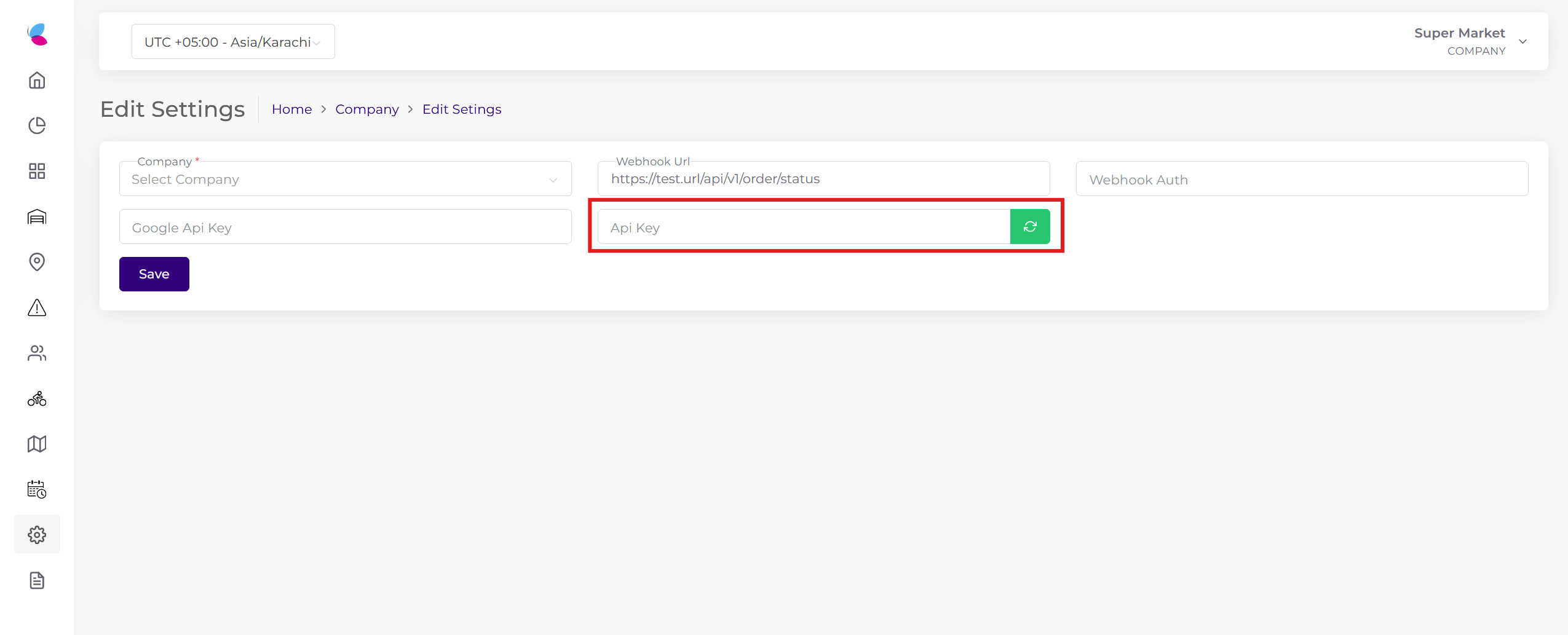
Logistics Base URLs
Task Creation
The API allows you to send a task to the logistics portal.
Endpoint
Authorization
Request Parameters
| Parameter | Type | Required | Description |
|---|---|---|---|
| source | string | optional | The source of the task creation. |
| mappingKey | string | required | Reference Task Id. |
| mappingCode | string | required | Reference Task Id. |
| mappingBranchId | string | required | The ID of the branch. |
| discountCode | string | optional | The discount code used in the task. |
| tax | decimal | optional | The tax value of the task. |
| taxPercent | decimal | optional | The tax percentage of the task. |
| discount | decimal | optional | The discount amount of the task. |
| deliveryCharges | decimal | optional | The delivery charges of the task. |
| subTotal | decimal | optional | The sub total of the task. |
| grandTotal | decimal | optional | The grand total of the task. |
| paymentType | string | required | Payment method: COD (Cash on Delivery) or ONLINE. |
| description | string | optional | The task description. |
| instruction | string | optional | The task instructions. |
| customerName | string | required | The name of the customer. |
| customerEmail | string | optional | The email of the customer. |
| customerAddress | string | required | The address of the customer. |
| customerPhone | string | required | The phone number of the customer. |
| lat | string | required | The latitude of the customer's address. |
| lng | string | required | The longitude of the customer's address. |
| pickUpTime | datetime | required | The pickup time of the task (UTC Format). |
| deliveryTime | datetime | required | The delivery time of the task (UTC Format). |
| type | integer | required | The type of task: 1 (normal) or 2 (return). |
Sample Payload
{
    "source": "SourceTesting",
    "mappingKey": "12345678",
    "mappingCode": "12345678",
    "mappingBranchId": "12345",
    "discountCode": "",
    "tax": 0,
    "taxPercent": 0,
    "discount": 0,
    "deliveryCharges": 120,
    "subTotal": 2080,
    "grandTotal": 2200,
    "paymentType": "COD",
    "description": "Details: Milk Buffalo 1 Ltr Pouch, Quantity: 8",
    "instruction": "",
    "customerName": "Test Customer",
    "customerEmail": "[email protected]",
    "customerAddress": "Tariq Road, PECHS Block 2",
    "customerPhone": "923001234567",
    "lat": "24.871641",
    "lng": "67.059906",
    "deliveryTime": "2024-06-06T04:29:15.000Z",
    "pickUpTime": "2024-06-06T03:29:15.000Z",
    "type": 1
}
Sample Response
{
    "eventId": 20,
    "event": "TASK_CREATED",
    "data": {
        "taskId": "XYZAB-12345",
        "blinkOrderId": "12345678",
        "type": 1
    }
}
Task Update
The API allows you to update an existing task.
Endpoint
Authorization
Request Parameters
| Parameter | Type | Required | Description |
|---|---|---|---|
| taskId | string | required | Blink logistics unique Id. |
| discountCode | string | optional | The discount code used in the task. |
| tax | decimal | optional | The tax value of the task. |
| taxPercent | decimal | optional | The tax percentage of the task. |
| discount | decimal | optional | The discount amount of the task. |
| deliveryCharges | decimal | optional | The delivery charges of the task. |
| subTotal | decimal | optional | The sub total of the task. |
| grandTotal | decimal | optional | The grand total of the task. |
| paymentType | string | optional | Payment method: COD or ONLINE. |
| description | string | optional | The task description. |
| instruction | string | optional | The task instructions. |
| customerName | string | optional | The name of the customer. |
| customerEmail | string | optional | The email of the customer. |
| customerAddress | string | optional | The address of the customer. |
| customerPhone | string | optional | The phone number of the customer. |
| lat | string | optional | The latitude of the customer's address. |
| lng | string | optional | The longitude of the customer's address. |
| pickUpTime | datetime | optional | The pickup time of the task (UTC Format). |
| deliveryTime | datetime | optional | The delivery time of the task (UTC Format). |
| type | integer | required | Task type: 1 (normal) or 2 (return). |
Sample Response
{
    "eventId": 21,
    "event": "TASK_UPDATED",
    "data": {
        "taskId": "XYZAB-12345",
        "blinkOrderId": "12345678",
        "type": 1
    }
}
Get Task Status
The API allows you to get the task updated status.
Endpoint
Authorization
Query Parameters
| Parameter | Type | Description |
|---|---|---|
| mappingKey | string | Reference key. Example: 12345678 |
Sample Response
{
    "eventId": 24,
    "event": "TASK_ACCEPTED",
    "data": {
        "taskId": "XYZAB-12345",
        "blinkOrderId": "12345678",
        "type": 1,
        "reason": "",
        "agent": {
            "name": "Test Rider",
            "contact": "+923213456789"
        },
        "trackingLink": "https://delivery-stg.blinkco.io/tracking/jvkUgPIRN6f8jZg9q62xy"
    }
}
Task Status Reference
| Event Id | Event Name | Description |
|---|---|---|
| 20 | TASK_CREATED | A new order or shipment has been created in the system. |
| 21 | TASK_UPDATED | An existing order or shipment details have been modified. |
| 22 | TASK_UNASSIGN | An order previously assigned to a driver is now unassigned. |
| 23 | TASK_ASSIGNED | An order has been allocated to a specific driver for processing. |
| 24 | TASK_ACCEPTED | The assigned driver has confirmed they can handle the order. |
| 25 | TASK_ARRIVED | The driver has reached the collection point. |
| 26 | TASK_STARTED | The driver has started moving toward the delivery location. |
| 27 | TASK_FINISHED | The goods have been delivered to the final destination. |
| 28 | TASK_CANCELLED | The order has been cancelled before completion. |
| 29 | TASK_REASSIGNED | The order has been re-assigned to a different driver. |
Task Status Webhook
This webhook allows you to update order status according to task status.
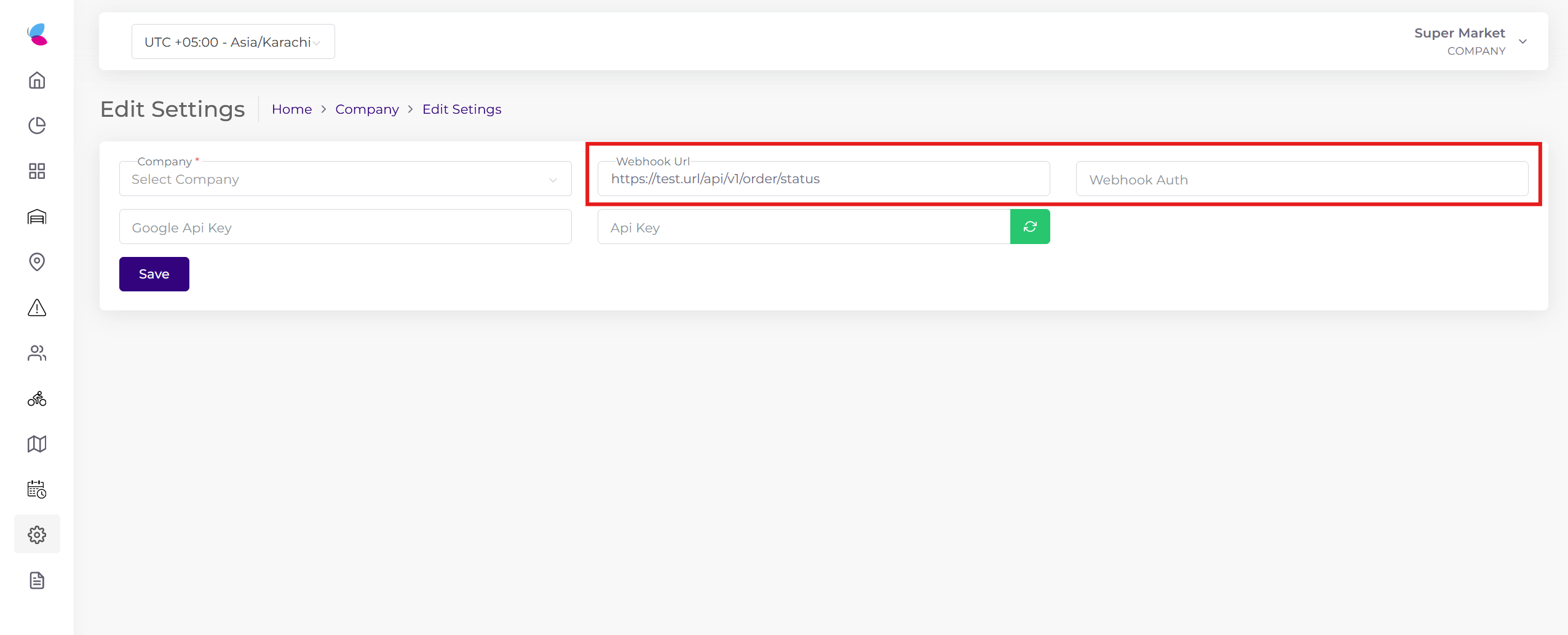
Sample Webhook Payload
{
    "eventId": 24,
    "event": "TASK_ACCEPTED",
    "data": {
        "taskId": "XYZAB-12345",
        "blinkOrderId": "12345678",
        "type": 1,
        "reason": "",
        "agent": {
            "name": "Test Rider",
            "contact": "+923213456789"
        },
        "trackingLink": "https://delivery-stg.blinkco.io/tracking/jvkUgPIRN6f8jZg9q62xy"
    }
}